

With the rise of AI music generation, demand for AI music videos has also exploded. However, many users have never encountered this technology before and perceive it as having a certain barrier to entry.
In reality, creating music videos with AI is now essentially barrier-free. The biggest difference lies in the quality of the generated output and whether the video content aligns with the AI music. This is because it most effectively reflects the quality of the AI music video generator.
In this article, we’ll explore how to create a professional AI music video using Musicful, even if you’re a complete beginner. Let’s dive in!
How to Create A Professional AI Music Video?
The first thing to create a good AI music video is choosing a powerful AI music video generator. Here, we recommend Musicful AI music video generator. After testing five tools available on the market, we selected this one as our example. Not only does it deliver high-quality output, but its straightforward operation makes it suitable for users of virtually any age.
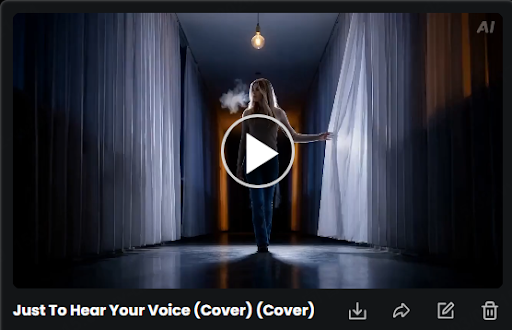
Here is the professional workflow for producing a high-quality music video with Musicful.
Phase 1: Preparation and Audio Analysis
Before generating a single frame, you must prepare your foundation.
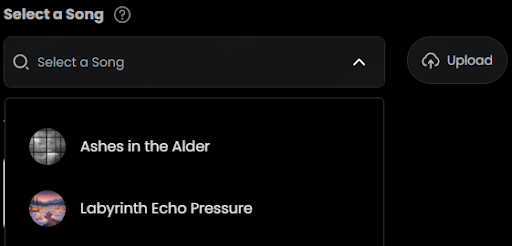
- Upload Your Audio: Log into your dashboard and upload your final master track (WAV or high-quality MP3).
- Define the Structure: Use the timeline tool to mark the key sections of your song.
- Tip: Mark the exact timestamp where the “drop” or the chorus begins (e.g., 0:45). This allows the engine to prepare a transition or a visual “energy boost” at that specific second.
- Analyze BPM: Ensure the platform has correctly identified the beats per minute. This data is what the engine uses to synchronize camera movements and visual pulses to your percussion.
Phase 2: Establishing Visual Consistency
To prevent the video from looking disjointed, you need a “Visual Anchor.”
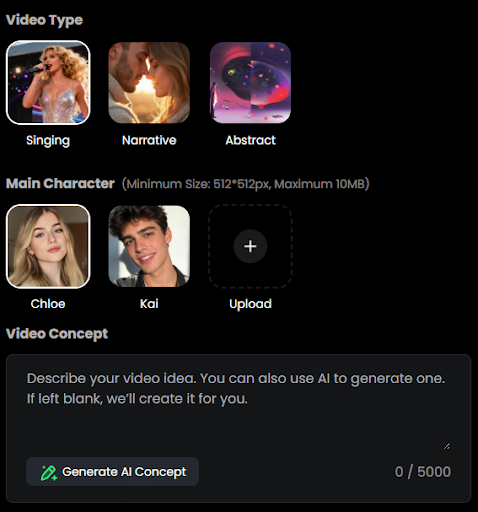
- Select Your Style Mode: Choose from preset styles or enter Expert Mode for custom prompting.
- Set the Core Prompt: In the global settings, input your aesthetic descriptors. To achieve a professional, cinematic look, include technical photography terms:
- Example: “Cinematic lighting, 8k, anamorphic lens flares, grainy film texture, [Specific Color Palette].”
- Upload a Reference Image (Optional but Recommended): Use the “Image-to-Video” slot to upload a concept sketch or a character portrait. This ensures the AI maintains the same face and environment throughout the different scenes.
Phase 3: Scene-by-Scene Generation
A great music video is a series of intentional shots. Instead of one long prompt, break the video into segments.
- The Opening Shot (0:00 – 0:15): * Prompt: Focus on the environment.
- Motion Control: Set the camera to “Slow Zoom” or “Pan Right” to create a sense of scale.
- The Verse (Narrative):
- Prompt: Focus on the subject or character.
- Motion Control: Use “Static” or “Subtle Motion” to keep the viewer focused on the mood.
- The Chorus (High Energy):
- Prompt: Add abstract elements or more dynamic action.
- Sync Intensity: Set the “Audio Reactivity” slider to High. This forces the visuals to flicker or move rapidly in response to the bass and snare.
Phase 4: Exporting and Post-Processing
The final steps ensure the video looks premium on all platforms.
- Upscale to 4K: Select the “Ultra-HD” export option. This process removes AI artifacts and sharpens the textures for big-screen playback.
- Select Frame Rate: For a cinematic “film” look, export at 24fps. For a smooth, modern digital look (especially for EDM or Pop), choose 60fps.
- Final Render: Hit “Generate Full Video.” The engine will stitch the scenes, apply the audio-reactive pulses, and provide a download link.
Pro Tip: If you find a particular shot “hallucinates” or looks strange, use the Seed Variation tool. It allows you to keep the composition of the shot but re-roll the details until the movement looks natural.
The Five Most Challenging Aspects of AI Music Video Generation
By 2026, users in the AI video sector have moved beyond the initial novelty of “image-to-video” conversion, now pursuing cinematic-level storytelling and commercial-grade delivery. Below are the most common challenges users currently face in AI music video production:
1. Character and Visual Consistency
Issue: After generating 10 seconds of video, the protagonist’s face, clothing, and even art style often undergo “genetic mutations.”
Consequence: Long-form music videos with narrative coherence cannot be produced. Users are forced to repeatedly draw cards, wasting significant computational resources and time.
2. Mechanical Disconnect Between Sound and Visuals
Issue: Video frames fail to synchronize with music’s beats or melodic fluctuations. AI merely generates “slideshows with background music” instead of videos that move in rhythm with the audio.
Consequences: Videos lack emotional impact and are easily flagged as low-quality “AI slop” by social media platforms (e.g., TikTok/YouTube).
3. Motion Hallucinations
Issue: Especially during “instrumental performances” or “dancing,” distorted fingers, body clipping, and stiff movements are commonplace.
Consequences: Severely undermines immersion; professional musicians find this “uncanny valley” effect unacceptable.
4. Workflow Friction
Issue: Users must repeatedly switch between 4-5 tools: audio generation, video card drawing, post-frame interpolation, and 4K upscaling.
Consequences: Creatively costly, with non-technical creators often abandoning projects during “environment setup” or “file conversion.”
5. Platform Compliance & Copyright Anxiety
Issue: Concerns about generated content being taken down by YouTube for “style copyright infringement” or failing synthetic content labeling reviews.
Can Musicful Solve These Core Issues?
In short: Yes, and it’s specifically designed to tackle these “industrial-grade pain points.”
While generalized AI video tools like Sora or Kling produce stunning visuals, they often lack an understanding of “musical logic.” Musicful’s core competitive edge lies in its identity not as a mere “video generator,” but as an audio-driven “AI director.”
Here’s how it specifically tackles those core pain points:
1. Addressing “Character Consistency”: Establishing Visual Anchors
Musicful introduces the Reference Anchor system.
Solution: Upload a fixed character design image (even hand-drawn sketches work). The system treats this image as “visual truth,” forcing the model to reference these features throughout subsequent 3-4 minute generates.
Result: Eliminates awkward inconsistencies like “a curly-haired girl at 10 seconds turning into a straight-haired woman at 20 seconds.”
2. Addressing “Audio-Visual Desynchronization”: Audio-Reactive Engine
This is Musicful’s signature feature. While ordinary tools require manual timing adjustments, this is automated.
Solution: The system automatically extracts Kick (bass drum) and Snare frequencies from the audio track. During video generation, it dynamically controls the “Motion Weight” of the visuals.
Effect: During drum hits, the frame undergoes instant displacement, zoom, or flash effects; during vocal sections, the footage automatically smooths out. This “breathing sensation” is what most AI videos lack.
3. Addressing “Unnatural Motion”: Precision Motion Brush
AI often moves randomly or fails to animate where needed.
Solution: Musicful offers Interactive Masks. If the protagonist’s guitar-playing hands appear static or background clouds seem stiff, you can directly paint over these areas and increase their “motion intensity.”
Effect: Transfers generation control from “pure luck” back to the “creator’s intent.”
4. Addressing “Fragmented Workflow”: Full-Path Closed-Loop
Solution: It integrates Audio Analyzer + Video Generator + AI Interpolation + 4K Upscaling.
Effect: You no longer need to generate video in Tool A, upscale it in Tool B, then manually edit and align in Tool C. Musicful exports finished products within a single page – a massive efficiency boost for developers and operators.
5. Addressing “Artistic Demands”: Avoiding “Plastic Look”
Regarding your previous concern about overly generic AI visuals:
Solution: Musicful’s model fine-tuning prioritizes Cinematic and Hand-drawn aesthetics.
Result: Combined with its specialized “warm orange-red” or “cool-toned film” presets, you can effortlessly create works with distinct artistic appeal – free from cheap AI-generated aesthetics.
While Musicful addresses most pain points, as an expert, I must caution you:
Extreme lip-sync precision: For highly complex, rapid-fire rap lyrics, current AI may still exhibit minor delays or breakdowns.
Computational cost: Enabling “Full Sync + 4K Super Resolution” mode is computationally intensive, resulting in longer generation times compared to standard low-quality videos.
Also Read:
