

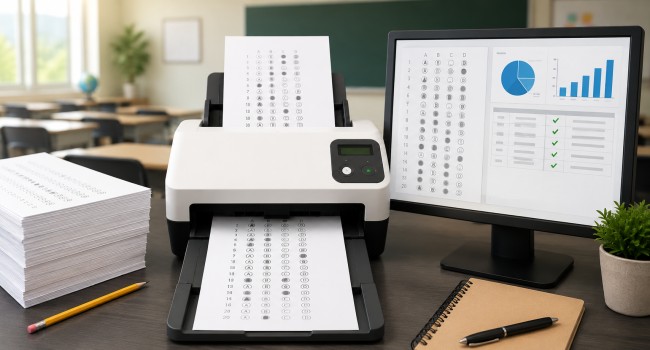
Paper tests are not gone, and they probably are not disappearing anytime soon. A lot of schools still rely on printed answer sheets for quizzes, benchmark exams, placement tests, make-up testing, and large-group assessments.
Some schools use them because they are simple. Others use them because device access is uneven, internet reliability is inconsistent, or teachers need a format that works the same way every time.
What has changed is the way schools process those forms. Years ago, bubble sheets often meant dedicated hardware, special forms, and a much more rigid setup. Today, schools have more options.
A teacher might use a mobile app for quick grading. A testing coordinator might rely on a browser-based platform. A district might use software that works with regular copiers and scanners rather than specialty equipment.
That flexibility is helpful, but it also creates a practical question: which kind of tool actually fits the way a school operates?
What A Bubble Sheet Scanning Tool Does
A bubble sheet scanning tool takes marks from a printed answer sheet and turns them into usable information. In plain language, it reads the student’s responses and converts them into data a teacher or administrator can actually work with.
That sounds simple, but there is more going on behind the scenes. The software has to recognize where each answer area sits on the page, detect whether a mark is filled strongly enough to count, and deal with issues like stray marks, erasures, multiple bubbles filled for one question, and sheets that were scanned a little crooked.
Some systems also support student identifiers, printed text recognition, barcodes, or other data points tied to the form.
Once the answers are captured, the software can score the test, generate reports, flag unusual responses, and export results into other systems.
That is the real payoff. It is not just about saving a teacher from hand-grading. It is about moving from paper to analysis without making staff do extra manual work.
A Typical School Workflow
In many schools, the process is pretty straightforward. A teacher creates or selects an answer sheet, students complete it by hand, and the finished forms are scanned using a copier, scanner, or another image-capture device.
The files are uploaded or sent into the grading platform, and the results are processed automatically.
That might look very different depending on the school. In a private tutoring center, one instructor may grade a stack of 25 tests after class.
In a high school testing office, staff may process several hundred forms in a single batch. The same general idea applies in both cases. The difference is scale, reporting needs, and how many people need access to the system.
The Main Kinds Of Bubble Sheet Scanning Tools
Schools usually run into three broad categories: locally installed software, phone-based grading apps, and hosted online platforms. Each has strengths, and each comes with tradeoffs.
Desktop Software
Desktop products are installed on a local Windows computer and often give users a lot of control. These tools are not always limited to test grading.
Many are built to handle a wider range of forms such as surveys, ballots, evaluations, and other structured documents. The source material points to examples such as Remark Office OMR and InspiroScan.
This kind of software can be a good fit for organizations that want more advanced form design options or need to process several types of paper forms from one platform.
At the same time, desktop tools are often less convenient for schools that want broad staff access. Installation, updates, device-based licensing, and general setup can create more work for IT teams.
Phone Apps And Low-Cost Tools
Some teachers go in a completely different direction and use mobile apps. These are usually built for speed and convenience.
A teacher can point a phone camera at a stack of tests, scan each one, and get scores without much setup. The source text names WordMint, Groovy Grader, SwiftGrade, and QuickGrader among examples in this part of the market.
For individual use, that can be appealing. A teacher with a tight budget may be happy with a simple app that handles weekly quizzes. But once a school starts thinking beyond one classroom, questions come up quickly.
How is student data handled? Where are images stored? Is the app approved by the school or district? How easy is it to manage classes, reporting, or shared access? A tool that works fine for one teacher may be a poor fit for a school trying to standardize testing practices.
Hosted Platforms
Hosted systems sit in the middle for many schools. They are usually accessed through a web browser, they do not require local installation, and they are built to support multiple users.
Schools often like this model because teachers can log in from different devices while administrators keep tighter control over the overall setup. The uploaded source mentions Remark Test Grading and ZipGrade as examples of this broader category.
This setup tends to work well for schools that want a cleaner process without relying on individual teacher devices or maintaining desktop software across a lot of machines. It can also make reporting and data flow more consistent from one teacher or department to the next.
When Schools Usually Need A More Serious Tool
Not every school needs a full-featured platform. A small class with occasional paper quizzes can get by with a simpler setup. Still, there are plenty of situations where a more capable system makes sense.
Large Testing Volumes
A school running common assessments across several grade levels can generate a huge pile of answer sheets in a single week. Hand-grading is slow, and delays make the results less useful. If teachers are supposed to review problem areas right away, the grading process has to move quickly.
Mixed Technology Access
Some schools are not ready to shift every assessment online. Others do not want to. Paper testing may still be the most practical option for certain student groups, certain classrooms, or certain parts of the school year. In those cases, scanning tools help bridge the gap between paper delivery and digital reporting.
More Than One Test Format
Real classrooms are rarely as standardized as software demos suggest. One teacher wants a basic multiple-choice sheet. Another wants student ID fields.
Another wants math grids or open-response sections alongside objective questions. A school that needs that level of flexibility usually has to look beyond the most basic scanning apps.
Reporting Beyond A Simple Score
Teachers often want more than a percentage at the top of the page. They may want to know which questions caused trouble across the class, which students missed the same concept, or whether one version of a test performed differently than another. That is where stronger platforms separate themselves from bare-bones tools.
What Schools Should Compare Before Choosing One
The best choice usually comes down to a few practical questions.
How Flexible Is The Form Design?
Some tools work best with fixed layouts. Others allow schools to build custom answer sheets with more control over question types, layout, and identifiers. That becomes important fast when multiple teachers or departments are involved.
Will It Work With Existing Equipment?
Most schools do not want to buy specialty hardware just to process answer sheets. Tools that work with standard scanners, copier-generated PDFs, and common image files are often easier to adopt.
How Easy Is It To Share Across Staff?
A teacher-friendly app is not always a school-friendly system. If a department chair, testing office, IT team, and classroom staff all need visibility or control, the software has to support that without turning everyday grading into a technical project.
What Kind Of Analysis Does It Provide?
Fast scoring is helpful, but strong reporting is usually what makes the purchase worthwhile. Schools want to spot class-wide weak areas, review item performance, and move results into gradebooks or other reporting systems when needed.
Where A Tool Like Remark Fits In
If a school wants something more substantial than a phone app but less cumbersome than old-school dedicated scanning hardware, this is where a platform like Remark often enters the conversation.
A bubble sheet scanning tool such as Remark Test Grading is built for schools that still use paper testing but want quicker grading, better reporting, and a workflow that works with ordinary printers, scanners, and browser-based access rather than specialty equipment.
That kind of setup is especially useful for schools trying to keep paper assessments practical without dragging teachers into a slow, manual process.
The goal is not to make testing more complicated. It is to make the follow-up faster and easier for the people who actually have to use the results.
Also Read:
