I play PC games regularly, but I am not someone who wants to spend a lot of time changing system settings before every session. Most days, I just want to open my PC, pick a game, and start playing.
The problem is that my gaming experience is not always consistent. Sometimes I get smooth FPS, while other times I notice frame drops, background apps slowing things down, or connection issues in multiplayer games.
That is why I decided to use Smart Game Booster as part of my daily gaming routine. I had previously looked at it for FPS and PC optimization, but this time I wanted to see how practical it was when used regularly.
After using it across different gaming sessions, I found that its biggest advantage is convenience. It gives me several useful tools in one place, although I also found a few limitations worth knowing about.
My Daily Setup With Smart Game Booster
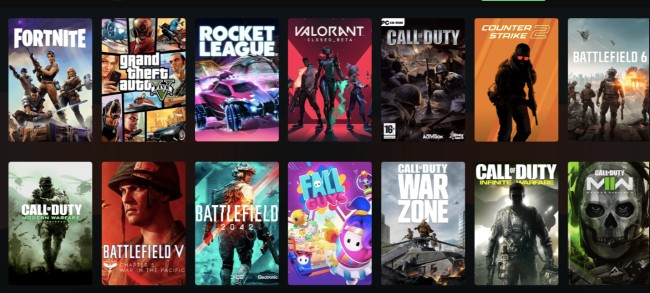
Getting started did not take much effort. I followed roughly the same process before most gaming sessions.
Open Smart Game Booster
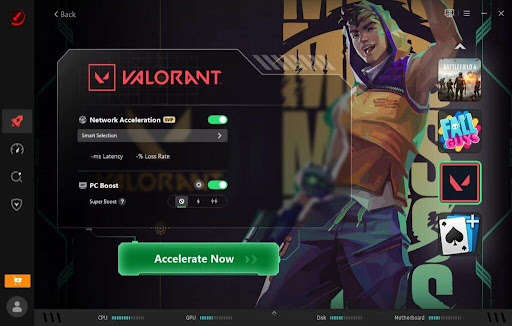
I installed Smart Game Booster on my Windows PC and launched it before starting a game. The software scanned my system and showed the available optimization options.
Pick the game I want to play
I selected my game from the list. This gave me a quick way to prepare my PC instead of manually checking different settings.
Start the boost
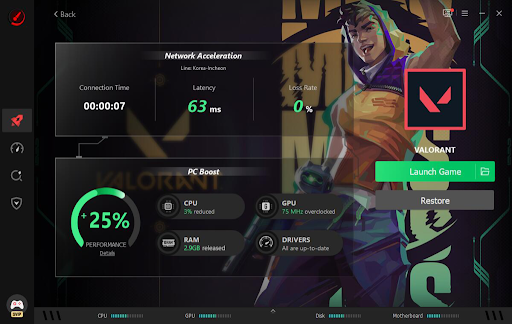
I clicked the boost option and let the software manage unnecessary background processes and system resources. I then checked the optimization results before launching the game.
Play and compare
After the boost was complete, I started the game. I mainly watched for FPS drops and general smoothness. With multiplayer games, I also paid attention to ping and connection stability.
The process became quite quick once I got used to it.
What I Noticed During Daily Use?
The biggest change was not a massive FPS jump. Instead, I found that my games felt more consistent in some situations. When I had several applications running before gaming, Smart Game Booster helped reduce some of that background activity. This was useful on my PC because I do not have a lot of extra system resources to spare.
I noticed fewer small interruptions in some games, especially during longer sessions. The difference was not the same every time, but it was enough for me to keep the software in my regular gaming routine.
Key Features of Smart Game Booster I Experienced During Daily Use
Here are some amazing features of Smart Game Booster I liked.
FPS Optimization
FPS performance was one of the main things I wanted to test. Smart Game Booster works by reducing unnecessary system activity and giving the game more access to available resources. I did not suddenly get a massive increase in FPS, but some games felt smoother after I used the boost mode.
I also tried the dedicated FPS Booster features when I wanted to focus more closely on game performance.
PC Optimization
Smart Game Booster also includes tools for managing startup programs and unnecessary files. I used these features occasionally rather than before every gaming session. They helped me reduce some of the clutter on my PC and control which programs launched automatically.
This does not directly make every game faster, but it helps keep my system in better shape for daily use.
Network Optimization for Online Games
I spend a good amount of time playing multiplayer games, so I also tested the network tools. The software attempts to improve the connection route between my PC and game servers. During some sessions, I felt that the connection was more stable after using the network boost.
However, this was not a guaranteed improvement every time. If my internet connection itself was having problems, the software could not completely solve them.
I think this is important because a game booster should not be treated as a replacement for a good internet connection.
What I Didn’t Like?
- Results varied between games
- It cannot overcome weak hardware
- Some features may require a paid version
Final Thoughts
After using Smart Game Booster as part of my regular gaming routine, I found it useful mainly because it saves time. The results are not dramatic in every situation but you will experience a difference.
For me, though, the smaller improvements added up. My games felt more consistent in some sessions, my PC was less cluttered, and I had an easier way to check drivers and prepare my system.
I think Smart Game Booster is worth trying. It does not solve every gaming problem. However, in my experience, it makes the process of getting ready to play much easier.
Also Read: